Telegram-ի դրամապանակը դարձավ Walt. ինչ փոխվեց, վճարներ, սահմանաչափեր և ինչպես դուրս բերել
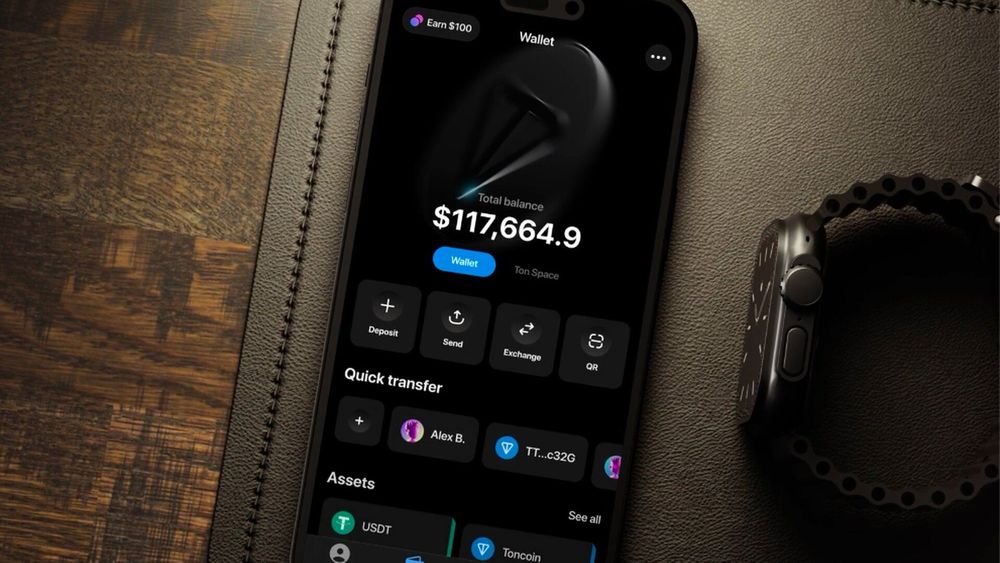
Telegram-ի դրամապանակը, որից տասնյակ միլիոններ օգտվում էին Wallet անունով, 2026 թվականի սեպտեմբերի 28-ին վերանվանվեց Walt։ Միաժամանակ Telegram-ը ներկայացրեց երկրորդ արտադրանքը՝ Gram Wallet։ Օգտատերերը հարցնում են՝ ուր գնաց իրենց USDT-ն, ինչ տեղադրել և արդյոք պետք է կրկին անցնել նույնականացում։ Ստորև՝ ինչպես է աշխատում Telegram-ի դրամապանակը բաժանումից հետո, որքան արժեն գործառնությունները և ինչպես դուրս բերել կրիպտոն արտաքին հասցեին։
Հիմնական եզրակացությունները
- Telegram-ի Wallet-ն այժմ Walt է՝ առանձին պահառուական հավելված առևտրի, ներդրումների և պահպանման համար, գտնվում է @walt որոնմամբ։
- Gram Wallet-ը Telegram-ում ներկառուցված նոր ինքնապահպանվող դրամապանակ է՝ Stars-ի, նվերների, օգտանունների և հավելվածների ներսում գնումների համար։
- Գործող օգտատերերի հաշիվները, մնացորդները, պատմությունն ու հասցեները պահպանվում են. կրկնակի նույնականացում պետք չէ։
- Դուրսբերման վճարը կախված է ցանցից՝ 1 USDT TON-ում ընդդեմ 3,5 USDT TRC-20-ում։
- Նույնականացումը պարտադիր է՝ բազային մակարդակը՝ բոլորի համար, փաստաթուղթ և կենդանության ստուգում՝ P2P-ի ու բարձր սահմանաչափերի համար։
Հիմնական հասկացությունները
- Պահառուական դրամապանակ — ծառայություն, որը մասնավոր բանալիները պահում է ձեզ համար. Walt-ը պահառուական է։
- Ինքնապահպանվող դրամապանակ — այնպիսին, որտեղ բանալիներն ու վերականգնման արտահայտությունը պահում եք միայն դուք. Gram Wallet-ը և DeFi Account-ը ինքնապահպանվող են։
- Gram — Toncoin-ի նոր անունը, TON բլոկչեյնի հիմնական մետաղադրամը, ընդունված 2026 թվականին։
- DeFi Account — Walt-ի ներսում գտնվող ինքնապահպանվող TON-հասցեն, նախկինում՝ TON Space։
- P2P Market — Walt-ի շուկան, որտեղ օգտատերերը միմյանցից գնում և միմյանց վաճառում են կրիպտո՝ էսքրոու պաշտպանությամբ։
Ինչ փոխվեց սեպտեմբերի 28-ին
Մինչ այժմ Telegram-ում մեկ ծառայություն կար՝ Wallet, պահառուական կրիպտոդրամապանակ, որտեղ բանալիները պահում էր օպերատորը, իսկ օգտատերը մնացորդը կառավարում էր մինի-հավելվածով։ Այժմ երկու ուղղությունները բաժանված են։
- Walt — նախկին Wallet-ն է. Telegram-ի ներսում առանձին հավելված առևտրի, ներդրումների և պահպանման համար՝ ավելի քան 200 կրիպտոարժույթով, ներառյալ Bitcoin, USDT, Ethereum և Gram, թոքենացված ամերիկյան բաժնետոմսեր ու ETF-եր, մշտական ֆյուչերսներ և եկամտային արտադրանք։
- Gram Wallet — ներկառուցված ինքնապահպանվող դրամապանակ հարթակի ներսում ամենօրյա գործողությունների համար՝ Stars, նվերներ, օգտանուններ և մինի-հավելվածների գնումներ։ Այն նախատեսված է փոքր գումարների, ոչ թե առևտրի համար, և տարածման ընթացքում կդառնա Telegram-ի կարգավորումների կանխադրված տարբերակը։
Gram Wallet-ը տարածվում է փուլերով։ Եթե այն դեռ չի հայտնվել ձեր Telegram-ի կարգավորումներում, ձեր հերթը չի հասել. մի՛ տեղադրեք նույն անունով երրորդ կողմի հավելվածներ, դրանք ֆիշինգ են։
Եվս մեկ վերանվանում է բացատրում նոր պիտակները. 2026 թվականի ամռանից TON մետաղադրամը կոչվում է Gram, և Walt-ի ինտերֆեյսը այն ցույց է տալիս որպես «GRAM (նախկին TON)»։
Գործող օգտատերերը ոչինչ տեղափոխելու կարիք չունեն։ Հաշիվները, մնացորդները, գործարքների պատմությունը և դրամապանակների հասցեները պահպանվում են, կրկնակի նույնականացում չկա։ Բացեք Walt-ը և ստուգեք, որ ամեն ինչ տեղում է։
Ինչպես սկսել Walt-ով
Գրանցումը տևում է մի քանի րոպե. բացեք @walt, ընդունեք պայմանները և սահմանեք գաղտնակոդ։ Ծառայությունը պաշտպանված է Telegram-ի գաղտնագրմամբ, գործառնությունների առանձին գաղտնակոդով և երկգործոն նույնականացմամբ, որն արժե անմիջապես միացնել։
Walt-ում ինքնության հաստատումը պարտադիր է, քանի որ դա կարգավորման պահանջներով գործող պահառուական ծառայություն է։ Մակարդակները երեքն են.
| Մակարդակ | Ինչ եք տրամադրում | Ինչ եք ստանում |
|---|---|---|
| Բազային | անուն-ազգանուն, ծննդյան ամսաթիվ, հեռախոսահամար | պարտադիր է բոլորի համար, մեկնարկային սահմանաչափեր |
| Ընդլայնված | ինքնությունը հաստատող փաստաթուղթ և կենսաչափական կենդանության ստուգում | ավելի բարձր սահմանաչափեր և գնումներ P2P Market-ում |
| Առաջադեմ | նաև բնակության հասցեի հաստատում | օգտագործում առանց սահմանաչափերի |
Մուտքային փոխանցումների, համալրումների և գնումների սահմանաչափերը կախված են մակարդակից ու տարածաշրջանից և ցուցադրվում են «Կարգավորումներ — Նույնականացման մակարդակ» բաժնում։ Դրանք գերազանցելու դեպքում Walt-ը կարող է պահանջել միջոցների ծագման ապացույց։ Ինչու են հարթակները խնդրում անձնագիր և սելֆի, բացատրել ենք մեր ուղեցույցում՝ կրիպտոբորսայի KYC։
Ինչպես համալրել և գնել կրիպտո
Մնացորդը համալրելու երեք ճանապարհ կա։
- Փոխանցում արտաքին հասցեից։ Համալրումն անվճար է։ Յուրաքանչյուր մետաղադրամ ունի նվազագույն՝ օրինակ TRON ցանցում 0,003 USDT, իսկ Bitcoin-ը նվազագույն չունի։ Նվազագույնից ցածրը չի հաշվեգրվում։
- Գնում քարտով։ Իրականացնում են երրորդ կողմի մատակարարներ Mercuryo-ն և Alchemy Pay-ը՝ իրենց պայմաններով։ Mercuryo-ի միջոցով USDT-ն կարելի է գնել առանց հավելավճարի՝ ձեր մակարդակից կախված սահմանաչափի շրջանակում։ Ռուսական բանկային քարտերի համար այս ուղին փակ է, ուստի Ռուսաստանում հիմնական տարբերակը երրորդն է։
- P2P Market։ Օգտատերերը հայտարարություններ են տեղադրում կրիպտո գնելու և վաճառելու համար՝ ռուբլով և այլ արժույթներով, վճարումը՝ բանկային փոխանցմամբ կամ քարտով։ Վաճառողի մետաղադրամները արգելափակվում են էսքրոուում և ազատվում գնորդին՝ վճարումը հաստատվելուց հետո։ Ով արձագանքում է առկա հայտարարությանը, վճարում է 0%. վճարներ գանձվում են միայն հայտարարություն տեղադրողներից և միայն կատարված պատվերների դեպքում։ Հայտարարություն տեղադրելու համար պետք է Merchant կարգավիճակ և ապահովման գումար։
P2P-ում գնելն ավելի պարզ է, քան թվում է, բայց կա մեկ կանոն. վճարեք միայն ձեր սեփական անունով քարտից և միայն այն վաճառողին, ում հայտարարությունն ընտրել եք։ Ուրիշի քարտից վճարումը պատվերը սառեցնելու հիմք է։
Walt-ի վճարներն ու սահմանաչափերը
Համալրումն անվճար է, հավելվածի ներսում փոխանակման վճարը կախված է ձեր մակարդակից (Կարգավորումներ, Tiers), իսկ բլոկչեյն դուրսբերումն ունի ֆիքսված վճար։ Ընթացիկ վճարները ցուցադրվում են հաստատման էկրանին. ստորև թվերը հրապարակման պահի ուղենիշային արժեքներն են։
| Գործառնություն | Վճար |
|---|---|
| USDT-ի դուրսբերում, TON ցանց | 1 USDT |
| USDT-ի դուրսբերում, TRON (TRC-20) | 3,5 USDT |
| USDT-ի դուրսբերում, Solana | 1,5 դոլար |
| USDT-ի դուրսբերում, Ethereum | 4 դոլար |
| Bitcoin-ի դուրսբերում | 0,00008 BTC, լողացող |
| Gram-ի դուրսբերում | 0,05 GRAM |
| Համալրում | անվճար |
Նվազագույն դուրսբերումը 1 USDT կամ 0,0001 BTC է։ Հավելվածի ներսում փոխանակումները սկսվում են գործարքի 1,4 USDT-ից և հասնում 25 000 USDT-ի զույգերի մեծ մասի համար, իսկ USDT-BTC և USDT-ETH զույգերի դեպքում՝ 100 000 USDT-ի։ Walt-ը զգուշացնում է, որ բոլոր վճարները կարող են փոխվել, և գործառնության պահին հավելվածում երևացող թվերն առաջնային են ցանկացած օգնության հոդվածի նկատմամբ։
Ամենօրյա փոխանցումների համար ցանցի ընտրությունը որոշիչ է. նույն USDT-ն TON-ում դուրս բերելն երեքուկես անգամ էժան է, քան TRC-20-ում։ Եթե ստացողն ընդունում է երկուսն էլ, ընտրեք TON-ը։
Ինչպես դուրս բերել կրիպտոն Telegram-ի դրամապանակից
Ընթացակարգը նույնն է բոլոր մետաղադրամների համար։
- Գլխավոր ընտրացանկում սեղմեք «Դուրս բերել», ապա՝ «Արտաքին դրամապանակ կամ բորսա»։
- Ընտրեք ակտիվը և տեղադրեք ստացողի հասցեն։ TON ցանցի թոքենների, բաժնետոմսերի և ETF-երի համար հասցեի փոխարեն կարող եք մուտքագրել .ton կամ .t.me դոմեն։
- Եթե դուրս եք բերում բորսա, ավելացրեք մեկնաբանությունը (tag կամ memo)։ Բորսաներն այդպես են ճանաչում փոխանցումը. առանց դրա հաշվեգրումը պետք է հետապնդել աջակցման միջոցով։
- Ստուգեք ցանցը. TRON-ի USDT-ն և TON-ի USDT-ն տարբեր հասցեներ են, և դրանք շփոթելը նշանակում է կորցնել փոխանցումը։
- Հաստատեք։ Գործարքի ստուգումից հետո մետաղադրամներն ուղարկվում են բլոկչեյն։
Ժամկետը կախված է ցանցից. TON-ի և TRON-ի փոխանցումները մեկնում են ստուգումից անմիջապես հետո, Bitcoin-ը՝ սովորաբար մի քանի րոպեում, Ethereum-ն ու Solana-ն՝ ցանցի բեռնվածությանը համապատասխան։ Գործարքի հեշը պատմությունում հայտնվում է միայն Success կարգավիճակով գործառնությունների համար. քանի դեռ կարգավիճակը Pending է, բլոկչեյն ոչինչ չի ուղարկվել, և դուրսբերումը դեռ կարելի է չեղարկել աջակցման միջոցով։
Կարելի՞ է դուրս բերել բանկային քարտին։ Ուղղակիորեն՝ ոչ. մետաղադրամները վաճառվում են P2P Market-ում, և գնորդը ֆիատը փոխանցում է ձեր քարտին։ Ցանկացած հարթակի ընդհանուր ընթացակարգը մեր ուղեցույցում է՝ ինչպես դուրս բերել կրիպտոն բորսայի հաշիվներից։
DeFi Account. ինքնապահպանվող մասը
Walt-ի ներսում կա DeFi Account ռեժիմ, նախկինում՝ TON Space։ Դա TON բլոկչեյնի առանձին հասցե է, որի բանալիները պահում եք միայն դուք։ Մուտքը վերականգնվում է սերմնային արտահայտությամբ, և ոչ ոք, այդ թվում աջակցումը, չի կարող այն ձեզ համար վերականգնել։
DeFi Account-ի միջոցով միանում եք TON էկոհամակարգի հավելվածներին, թոքեններ եք առևտրում ապակենտրոնացված բորսաներում և պահում NFT-ներ։ Այդ ազատության մյուս կողմը պատասխանատվությունն է. TON-ում ցանկացած ոք կարող է թողարկել հայտնի կրիպտոարժույթի անունով թոքեն, ուստի ծառայությունը հատուկ զգուշացնում է չստուգված jetton-ների, կեղծ NFT-ների, փոշի-փոխանցումների և աջակցում ձևացող բոտերի մասին։ Երբեք մի պահեք սերմնային արտահայտությունը նշումների հավելվածում և մի ուղարկեք որևէ մեկին, ով խնդրում է այն։
Վճարումներ և մետաղադրամների ուղարկում
Walt-ի ներսում Telegram-ի մեկ այլ օգտատիրոջ փոխանցումները կատարվում են օգտանունով՝ առանց հասցեների և առանց բլոկչեյնի հաստատումների սպասելու։ Դա հեշտացնում է նվերի համար գումար հավաքելը կամ պարտքը USDT-ով վերադարձնելը հենց զրույցում։
Walt-ը թույլ է տալիս նաև Gram-ով գնել Telegram Stars և վճարել բաժանորդագրությունների ու թվային ապրանքների համար այն բոտերում, որոնք ընդունում են վճարումներ։ Telegram-ից դուրս գնումների համար այն հարմար գործիք չէ. Ռուսաստանում կրիպտոն օրինական վճարամիջոց չէ, և ծառայությունն ինքն է նշում, որ չի գտնվում Ռուսաստանի Բանկի ռեեստրում և նախատեսված չէ Ռուսաստանի ռեզիդենտների ներերկրյա հաշվարկների համար։
Կարգավորումներ, որոնք արժե անմիջապես միացնել
- Գործառնությունների գաղտնակոդ։ Պարտադիր է ուղարկելու, փոխանակելու և դուրս բերելու համար, նույնիսկ երբ հեռախոսն ապակողպված է։
- Telegram-հաշվի երկգործոն պաշտպանություն։ Մեսենջերի հաշիվն ամեն ինչի բանալին է, ուստի ամպային գաղտնաբառը պարտադիր է։
- Ակտիվ սեսիաների ստուգում։ Telegram-ի սեսիաների ցանկում անծանոթ սարքը նշանակում է, որ ուրիշը հասանելիություն ունի ձեր մնացորդին։
- Գործարքների ծանուցումներ։ Ցանկացած շարժ, որը դուք չեք կատարել, ազդանշան է՝ փոխել գաղտնաբառերը և դիմել աջակցմանը։
Անվտա՞նգ է Telegram-ի դրամապանակը կրիպտո պահելու համար
Կախված է գումարից և նրանից, թե ծառայության որ մասն եք օգտագործում։
Walt-ը պահառուական է։ Քանի դեռ այն աշխատում է, դա հարմար է՝ մուտք ծանոթ մեսենջերով, հաշվի վերականգնում աջակցման միջոցով, պաշտպանություն բանալիների հետ սեփական սխալներից։ Բայց մետաղադրամները գտնվում են օպերատորի հասցեներին, և հարթակի ռիսկը երբեք չի անհետանում։ Այն գումարների համար, որոնք ցավ կպատճառեն կորցնելիս, ավելի ապահով է սերմնային արտահայտությամբ ինքնապահպանվող հասցեն կամ ապարատային դրամապանակը։
Ֆիշինգն առանձին սպառնալիք է։ «Walt-ի աջակցում» բոտերը, հղումով «դրամապանակն ակտիվացնելու» առաջարկները, ծառայության անունով խաղարկությունները՝ բոլորը ստանդարտ հնարքներ են, և բոլորը նախատեսված են, որ դուք ինքներդ հանձնեք կոդը կամ սերմնային արտահայտությունը։ Իրական աջակցումը երբեք առաջինը չի գրում։
Walt, թե՞ Tonkeeper
Նույն հարցն է, ինչ «բորսա, թե՞ սառը դրամապանակ»։ Walt-ը պահառուական հարթակ է՝ առևտրով, P2P-ով և ֆիատ գնումներով, հարմար է գործառնությունների համար։ Tonkeeper-ը TON ցանցի ինքնապահպանվող դրամապանակ է, որտեղ բանալիները պահում է օգտատերը և ներկառուցված ֆիատ մուտք չկա։ Խելամիտ կարգավորումը երկուսն էլ օգտագործում է՝ Walt՝ գնելու և փոխանակելու, Tonkeeper կամ DeFi Account՝ պահելու այն, ինչ չեք պատրաստվում ծախսել։
Ուր գնաց Telegram-ի Wallet-ը
Այն վերանվանվեց Walt և մնում է առանձին հավելված, գտնվում է @walt որոնմամբ։ Մնացորդներն ու պատմությունը պահպանվում են, ոչինչ տեղափոխելու կարիք չկա։
Ինչ է Gram Wallet-ը և պետք է արդյոք տեղադրել այն
Դա ներկառուցված ինքնապահպանվող դրամապանակ է Telegram-ի ներսում գործառնությունների համար՝ Stars, նվերներ, մինի-հավելվածների գնումներ։ Այն հայտնվում է մեսենջերի կարգավորումներում տարածման ընթացքում, և առանձին ոչինչ տեղադրելու կարիք չկա։
Պարտադի՞ր է նույնականացումը Telegram-ի դրամապանակի համար
Այո։ Անուն-ազգանվամբ, ծննդյան ամսաթվով և հեռախոսահամարով բազային մակարդակը պարտադիր է բոլորի համար. P2P գնումների և ավելի բարձր սահմանաչափերի համար պետք են ինքնությունը հաստատող փաստաթուղթ և կենդանության ստուգում։
Կարո՞ղ եմ Telegram-ի դրամապանակից դուրս բերել բանկային քարտին
Ուղղակիորեն՝ ոչ։ Մետաղադրամները վաճառում եք P2P Market-ում, և գնորդը ֆիատն ուղարկում է ձեր քարտին։ Խուսափեք շուկայից դուրս անծանոթների հետ կանխիկի դիմաց գործարքներից։
USDT-ի ո՞ր ցանցն է ավելի էժան
TON-ը՝ դուրսբերումն արժե 1 USDT ընդդեմ TRC-20-ի 3,5 USDT-ի։ Համոզվեք, որ ստացողն ընդունում է USDT TON ցանցում։
Ինչ եղավ TON Space-ի հետ
Այն մնում է Walt-ի ներսում՝ DeFi Account անունով։ Հասցեն, բանալիներն ու վերականգնման արտահայտությունը նույնն են, ոչինչ տեղափոխելու կարիք չկա։
EIDEX-ի կրիպտոշուկաների փորձագետ և բովանդակության ու մարքեթինգի բաժնի ղեկավար։ Գրում է շուկայի կառուցվածքի, բորսայի ենթակառուցվածքի և cross-chain առևտրի մասին՝ on-chain տվյալներն ու շուկայական տեղաշարժերը վերածելով թրեյդերների համար հասկանալի, գործնական վերլուծության։